Built for busy agents

More clients.
Less paperwork.

An AI assistant for real estate agents that handles everything between the handshake and the closing table — deadlines, contracts, follow-ups, and the details you're carrying in your head. Message it any time from your phone.

Free for 30 days, then $450/month. Cancel anytime.

It prepares. You decide. Nothing goes out without your say-so.

Sample conversation in Telegram. Reply times vary by task.

A new teammate.
Tools you already use.

Telegram Gmail Google Calendar Google DriveCanva

Small tasks. Big mental load.

You didn't get your license to chase paperwork.

From the first signed contract to the closing table, give the work behind the work some real help.

The details, handled

Every deadline, from contract to close.

Each deal gets its own file — people, key dates, tasks, and documents. Option periods and other deadlines are calculated from the contract terms, so you can ask "what's due this week?" and get a straight answer.

Transaction tracking + Texas deadline math
Less searching

Ask your paperwork.

Send a contract, addendum, or disclosure. Ask about earnest money, the title company, or paragraph 7 — answers come from your documents, with the source.

PDF reading + document Q&A

Walk in prepared

Know the property.

Pull public property details plus Texas MUD and water-district info in one message. Add your own HAR or RPR login and it can pull MLS-grade comps, too.

Property research in a conversation

Stay in the loop

Your inbox has a teammate.

It watches for deal-related email, keeps the transaction file current, and drafts the follow-up. Schedule morning briefings and reminders so nothing sneaks up on you.

Email + calendar + scheduled tasks

Blank page to first draft

Put your best work forward.

Client summaries, status updates, comparison sheets, and listing copy — drafted in your voice, ready for you to polish and send.

Documents + drafts + Canva

Personal from day one

It learns how you work.

Your preferred title companies, your lenders, how you like updates written. It remembers — and you can see and edit exactly what it knows.

Persistent memory you control

Connected tools use your own accounts and logins. MLS research requires your own HAR or RPR access. The assistant isn't a licensed transaction coordinator — review dates and dollar amounts before acting.

The real thing

A text message out front.
A full workspace behind it.

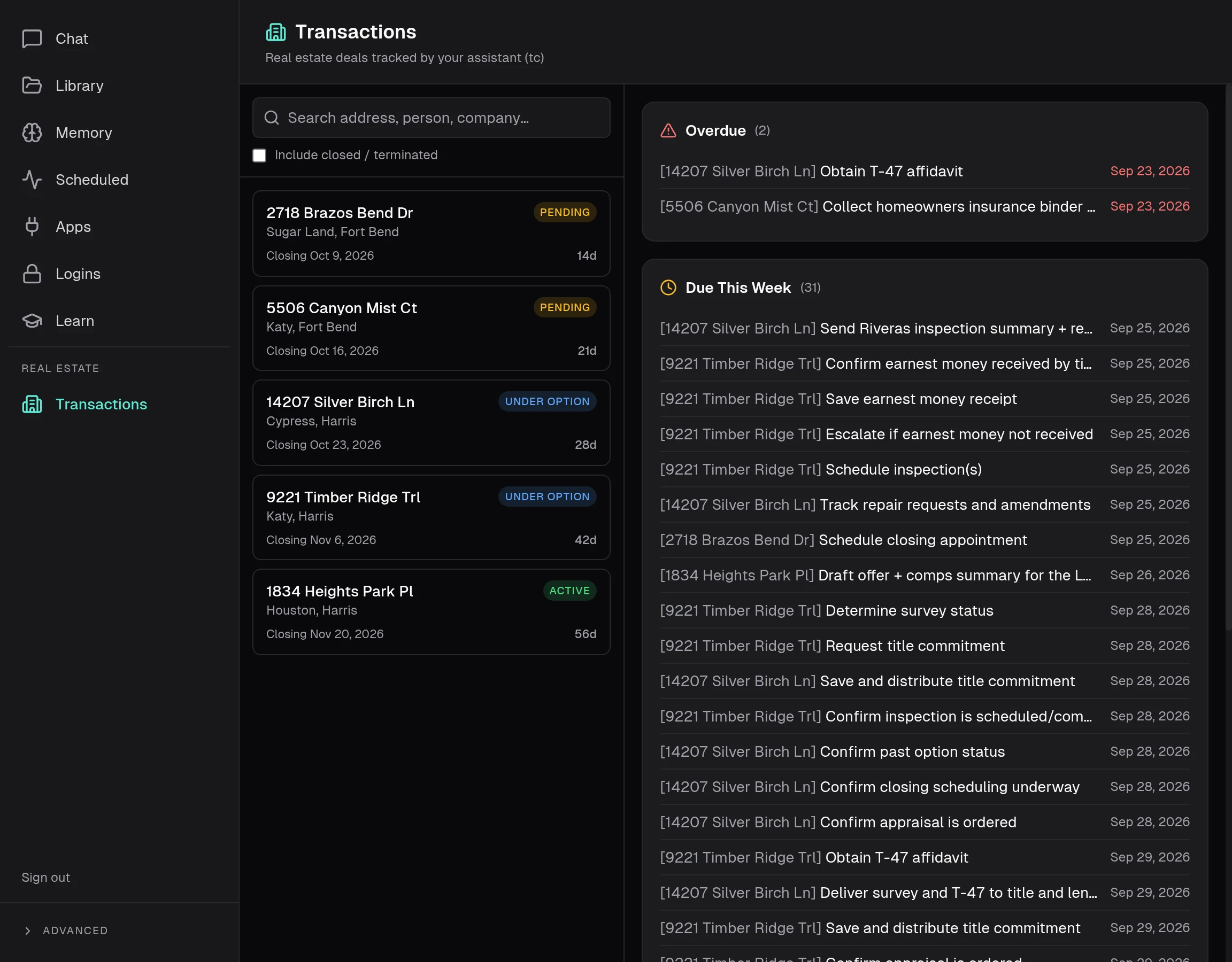
These are real screens from the assistant's web dashboard — shown with sample deals, not client data.

Every deal, at a glance.

All your active transactions in one place, with what's overdue and what's due this week pulled to the top.

  • Search by address, person, or company
  • Status and days-to-close on every deal
  • Overdue items can't hide
Your assistant workspace
Transactions dashboard listing five active deals alongside overdue and due-this-week task lists

A day with your assistant

The busywork
happens in the background.

You spend the day with clients. Your assistant keeps everything else moving — and tells you when it needs you.

  1. 7:00 AM

    Morning brief

    Two deadlines this week, one inspection report to review, three emails that need you — on your phone before your first coffee.

  2. 10:15 AM

    A contract lands

    The executed contract arrives by email. The deal file, key dates, and closing checklist are built before you've finished reading it.

  3. 1:40 PM

    Between showings

    "What's the HOA on Cypress Bend?" Answered from the car, with the source.

  4. 4:30 PM

    Follow-ups drafted

    Client updates and lender check-ins are waiting for your approval. Edit, approve, move on.

  5. Overnight

    Still on it

    It keeps an eye on the inbox, keeps deal files current, and flags anything that moved.

Your judgment. Your relationships.

A capable assistant.
Still your business.

It gets the information together so you can bring the experience, empathy, and judgment only you have.

01

Your assistant prepares.

Finds the details. Organizes the tasks. Drafts the update.

02

You make the call.

Check the facts, adjust the approach, approve the next step.

03

Your client gets you.

Present, prepared, and focused on the relationship.

Do the math

Virtual assistant vs. AI assistant

CategoryVirtual assistantAI assistant
Monthly cost$2,000 – $4,000+$450
AvailabilityBusiness hoursAny hour, any day
Getting startedWeeks of hiring and trainingOne onboarding call
When they move onYou start overNothing is forgotten
Busy seasonOne person's bandwidthKeeps up with your volume
Phone calls & errandsYesNo — it's software

Typical U.S. rates for a dedicated part- to full-time virtual assistant. Your mileage will vary — that's what the free trial is for.

Getting started

Up and running
in one conversation.

01

Start your free trial.

Sign up through secure Stripe checkout. 30 days free, and the price after that is right there up front.

02

Book your onboarding call.

Pick a time right after checkout. We'll connect your accounts, learn your preferences, and set your approval rules together.

03

Put it to work.

Send a contract. Ask what's due. Draft a client update. Start with the task that's eating the most of your day.

Simple pricing

Give yourself
some breathing room.

Try it in your actual workday. Bring the contracts, the questions, and the to-do list — and see what a month with a real assistant feels like.

Built and supported by BCG Ventures, a real team you can email.

Your AI assistant30 days free
$450/month

after your free 30-day trial

  • Transaction tracking with Texas deadline math
  • Contract and document Q&A
  • Property research, including MUD & water districts
  • Email, calendar, and scheduled briefings
  • Memory you can review and edit
  • Telegram on your phone + a web dashboard
  • Personal onboarding call
Start my free trial

Secure checkout by Stripe

Payment method required at signup. $0 due today. $450 USD/month begins after 30days and renews monthly until canceled. Cancel before the trial ends and you won't be charged. Sales tax may apply.

Good questions

Let's clear
things up.

Something else on your mind?

Talk to a real person
How does the free trial work?

Your first 30 days are free. You'll add a payment method through Stripe's secure checkout when you sign up — $0 is charged today; if you keep going, billing starts at $450/month after the trial. Cancel before day 30 and you won't be charged.

How do I cancel?

Email brian@bcg-ventures.com and we'll cancel it — no forms, no retention calls. Your subscription stops at the end of the current period.

Is this built for my market?

Transaction checklists follow Texas (TREC/TAR) resale practice, water-district lookups are Texas-only, and MLS research uses HAR.com (Houston) or RPR with your own login. Document Q&A, email, drafting, and memory work anywhere. Outside Texas? Talk to us before you sign up.

Will it send messages or make decisions for me?

Only what you allow. During onboarding you decide which tools it can use and what needs your approval. Out of the box, it prepares drafts and waits for you. Like any AI, it can make mistakes — so you review dates, dollar amounts, and anything that goes to a client. Your professional judgment stays in charge.

What do I need to get started?

A phone with Telegram (free) or any web browser. After checkout you'll book a short onboarding call where we connect your email, calendar, and other accounts and set it up the way you work.

Is my data private?

Each assistant runs in its own private workspace — your deals and documents aren't shared with other customers. Passwords you give it are stored encrypted, and it uses them without ever seeing them.

Does it replace my transaction coordinator or CRM?

It works alongside them. Many agents use it to cover the gaps — the late-night questions, the follow-ups, the deadline tracking — so the people and tools you already rely on can do more.

A little less admin.
A lot more agent.

Start your free trial 30 days free · then $450/month · cancel anytime
Start your 30-day free trial